
Getting a good marquee animation on your website is a difficult feat. Especially for newbie webmasters. But I learned an easy way to get a good marquee animation with only HTML and CSS! I used the particular code below for the blinkie marquee on my homepage, but you can change the code for a marquee of stamps or buttons.
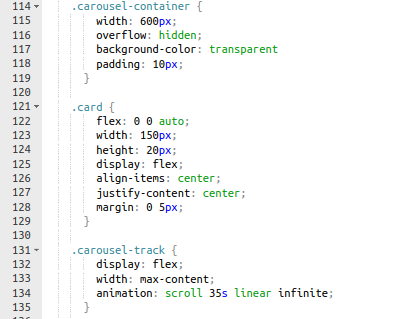
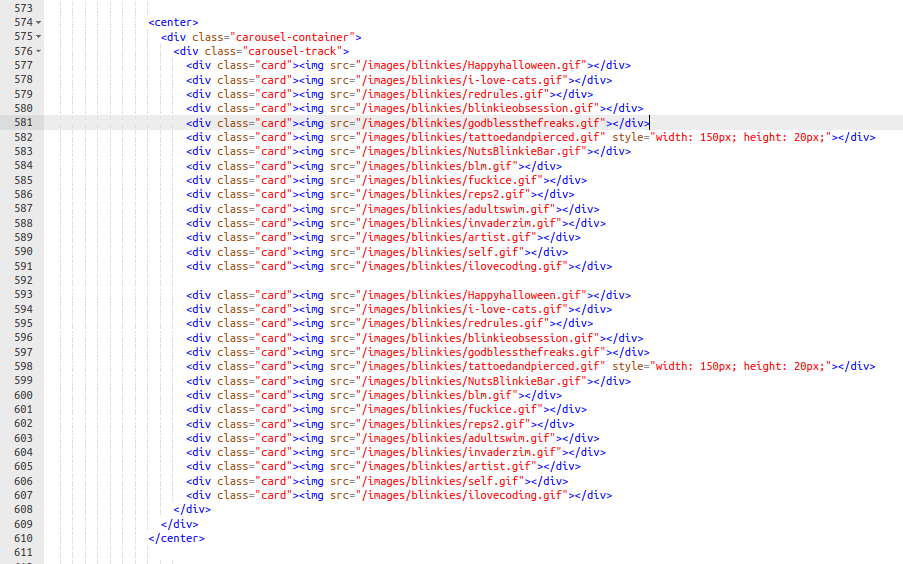
.carousel-container: your whole marquee space
width: the width of your visible marquee
overflow: hidden;: hides space beyond set width
.carousel-track: the row your imgs scroll across
animation: your maquee animation, replace the number in 35s depending on the speed you want for your marquee
.card: your images (blinkies, buttons, stamps, etc.)
width, height: set exact height and width of all your images (ex. set width 150px, height 20px for blinkies. width 88px, height 31px for buttons.)